
Basic Imageprocessing in C Part 2
Introduction
One of the most basic things you can do to an image is convert it into a grayscale colorspace. Now when you grayscale an image every color channel of each pixel in an image will have the same value. This value will be called the luminance value and will instead represent the brightness or strength of each pixel. This is done in image processing application because it will make things such as applying convolution filters to an image via kernel much easier, since you only have to worry about one value. There are two ways that I know of to actually grayscale an image, one of which is objectively worse than the other but I am still going to mention it.
In both cases we iterate through every pixel in our buffer and perform a simple calculation with the color channels.
One way to grayscale an image is to take the average of the three color channels of each pixel and assign that average value to every color channel.
void grayscale(ImageData *data, int paddingOffset) {
  float lum;

  lum = 0.0f;
  int i, j;
  for (i = paddingOffset; i < data->rows - paddingOffset; i++) {
    for (j = paddingOffset; j < data->cols - paddingOffset; j++) {
      lum = (
        data->matrix[i * data->cols + j].red +
        data->matrix[i * data->cols + j].green +
        data->matrix[i * data->cols + j].blue) / 3;

      data->matrix[i * data->cols + j].red = lum;
      data->matrix[i * data->cols + j].green = lum;
      data->matrix[i * data->cols + j].blue = lum;
    }
  }
}
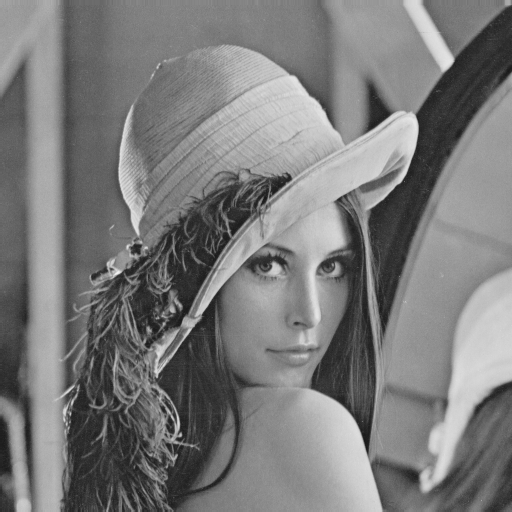
Here we iterate through every pixel excluding the padding and performing the grayscale calculation on each and the assigning the resulting luminance to the color channels. This algorithm produces this image.

While the algorithm did grayscale the image it looks like the brightness is on some parts of the image incorrect than the original image. The reason why this algorithm produces such a dark grayscale image, is because it disregards how human eyes perceive brightness and color. Under most conditions human eyes are very sensitive to green light, which causes us to perceive green light as brighter than blue or red light [1]. An improved algorithm for grayscaling an image would multiply each color channel with a appropriate weight regarding the sensitivity to light the human eye has.
void grayscale(ImageData *data, int paddingOffset) {
  float lum;

  lum = 0.0f;
  int i, j;
  for (i = paddingOffset; i < data->rows - paddingOffset; i++) {
    for (j = paddingOffset; j < data->cols - paddingOffset; j++) {
      lum = 0.3f * data->matrix[i * data->cols + j].red +
            0.58f * data->matrix[i * data->cols + j].green +
            0.11f * data->matrix[i * data->cols + j].blue;

      data->matrix[i * data->cols + j].red = lum;
      data->matrix[i * data->cols + j].green = lum;
      data->matrix[i * data->cols + j].blue = lum;
    }
  }
}
The weights that I am using in my implementation maybe different to the ones of other people, however the weight of the green channel is usually bigger than the weight of the red channel, which is bigger than the one of the blue channel.
The resulting image will have more accurate luminance values.
Closing Remarks
This part was a little shorter since we just implemented a little function to grayscale an image, however the ability to grayscale an image is a rather important feature of our program.
In the next part we will finally begin to implement some basic filters.
References
[1] Spectral Sensitivity of the Human Eye https://www.gigahertz-optik.com/en-us/service-and-support/knowledge-base/basics-light-measurement/light-color/spectr-sens-eye/